How to fix lag on a website with heavy animations

It's easy to get carried away with visual polish. Rotating hero sections, typing text effects, and twinkling background stars make a website feel alive, but they can easily ruin your browser's performance if left unchecked. We recently audited an animation-heavy page that looked great on desktop but left mobile users waiting. Under the hood, offscreen carousels were continuously re-rendering, hidden CSS transforms were causing massive layout jumps, and delayed entrance animations were tanking web vitals. Here is how we fixed 300px layout shifts, stopped unnecessary offscreen renders, and cut JavaScript main-thread work - all while keeping the visuals intact.

Stopping offscreen animations from performing to an empty room

The biggest problem wasn't visible on screen. After a user scrolled past the featured product carousel, a typewriter effect kept right on typing in the background. During a single 13-second offscreen window, the component triggered 205 unnecessary text updates.

Nobody was there to see it, but the browser main thread was still working away processing layout recalculations and React state changes.

Alongside offscreen rendering, we uncovered two other major issues: a 300px layout collapse caused by scaling CSS transforms, and artificial typing delays that held back key content from rendering.
Fixing artificial delays and React hydration flashes

When diagnosing slow load times, we needed to distinguish between actual network latency and deliberate presentation delays.

Our hero component used a strict sequential queue: the main heading typed out first, followed by a 1.1-second rotating logo animation, before product cues finally appeared. At a typing speed of 65ms per character, even a short heading took almost two seconds just to finish rendering.

To make matters worse, initial server-rendered HTML was being wiped out and re-typed as soon as React attached interactive behavior (hydration). We refactored the component to use a pending state, eliminating the full-text "flash" on load and keeping existing text visible until interaction began.

Replacing CSS transforms with grid layouts to prevent layout shift

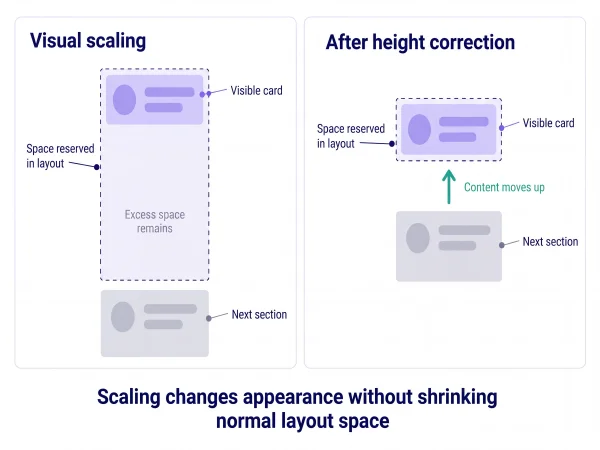
To shrink our featured product cards visually, the original stylesheet applied transform: scale(0.7). While CSS transforms altered visual appearance without affecting the document flow, JavaScript was subsequently measuring the card's bounding box and manually adjusting the container height on the fly.

This post-hydration script caused the page height to jump from 7,021px down to 6,721px - causing a massive 300px layout shift just as users started reading.

We replaced the JavaScript height calculations entirely with a pure CSS Grid layout stack, placing all carousel slides within the exact same grid cell:

Code example — Shortened extract of the shared slide layout

CSS

/* Stack all carousel slides in a single grid cell
   to reserve layout height */

.stage {
  display: grid;
}

.screen {
  grid-area: 1 / 1;
  visibility: hidden;
}

.screenActive {
  visibility: visible;
}

The grid automatically scales to fit the tallest product slide upfront, reserving full layout space before any JavaScript runs and keeping layout shift to near zero.

Using IntersectionObserver to pause unseen animations

Updating React state for every single character in a typewriter animation triggers frequent re-renders across the component tree. We refactored the typing loop to use requestAnimationFrame, calculating character progress from elapsed time and updating dedicated text DOM nodes directly.

More importantly, we introduced a strict stopping rule using IntersectionObserver:

  • Viewport Aware: When an animated element leaves the screen, its animation loop immediately pauses.

  • Tab Visibility: Switching tabs or minimizing the browser completely halts carousel timers and background CSS animations.

  • Accessibility First: Honoring prefers-reduced-motion and keyboard focus states automatically freezes automatic playback for users who prefer static layouts.

Lighthouse test results showed product text updates dropped from 205 down to exactly 0.

Illustrative comparison of offscreen animation continuing to type and cycle versus completed text with automatic cycling paused after leaving the viewport.
A smaller card can still occupy a larger space

Analyzing the performance improvements

We tested the refactored build under the simulated mobile conditions of (4x CPU slowdown, throttled 3G network), and saw immediate main-thread improvements:

  • First Contentful Paint (FCP): Improved from 2.04s down to 0.69s.

  • Layout Shift Score: Dropped from a disruptive 0.183 down to a stable 0.014.

  • Style Recalculations: Reduced from 910 down to 319.

  • JavaScript Execution Time: Cut from 336ms down to just 81ms.

The Trade-Off with Sequential Animations:

While initial paint was much faster, Largest Contentful Paint (LCP) stayed higher because key elements were still waiting for character-by-character typing sequences to finish. Making the browser faster cannot override a deliberate script delay, if your code mandates a 2-second typing delay, the browser must wait for it.

Balancing visual effects and web vitals

Creative design and high performance can coexist. Before removing an animation or reaching for a heavy third-party library, there are three core questions:

  1. Does it reserve its layout space upfront? Use CSS Grid or Aspect Ratio containers instead of measuring elements with JavaScript post-load.

  2. Does it stop when nobody is looking? Leverage IntersectionObserver and document.hidden checks to pause offscreen work.

  3. Are artificial delays blocking core content? Remember that delayed entrances and typewriter effects have a real web-vitals cost.