A whole chat panel was doing a somersault
At the next section boundary, the chat panel rotated through 360 degrees over 2.8 seconds. The conversation area, input, borders and shadows all joined the performance.
Nearby blurred gradients and animated starfields added more visual activity. One starfield covered a mobile section roughly 2,049 pixels tall.
These effects were plausible contributors to rendering pressure on the reported phone. The tests did not establish that any individual effect caused the freeze. Even when rendered smoothly, however, a rotating interface can be disorienting while the reader scrolls past it.
Mobile Chat received a 500-millisecond fade with 24 pixels of vertical movement instead. Focusing the panel cancelled its entrance, preventing the interface from continuing its arrival while someone tried to use it.
Phone-width and coarse-pointer layouts also held section-wide starfields at a static opacity. Large glows retained their gradients but lost additional blur filters. Wide desktop layouts kept their original rotations.
The design remained recognisable, with less movement competing for attention.
The address bar was changing the page height
Another finding involved something outside the website’s own interface.
The chat height limit used 100dvh, which follows the dynamic viewport height. As the browser’s address bar expands or retracts, that available height can change.
In a separate emulation, the dynamic viewport varied between 620 and 700 pixels. The chat panel grew from 548 to 628 pixels, and the document grew by the same 80 pixels before shrinking again.
Replacing the dynamic limit with 100svh, based on the small viewport, kept both measurements constant.
Code example — Illustrative stable viewport height limit
.chat-panel {
max-height: calc(100svh - var(--header-allowance));
}
This illustrates the unit change rather than reproducing the project’s complete sizing rules. Its preferred height and header allowance remained in place.
The trade-off was some unused space when the address bar collapsed. For this panel, stable geometry was preferable to continually filling newly available space.
Finished effects still needed cleaning up
Several completed entrances retained their final transform animations. The revised implementation removed those animation states after committing the visible result, and process cards no longer replayed on return scrolling.
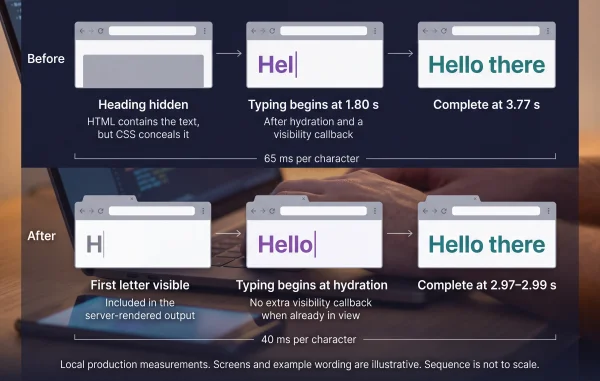
Product typing also finished when its container left view, avoiding continued updates to hidden text. Existing protections that paused other offscreen motion remained in place.
A separate inspection found an empty decorative pseudo-element extending beyond the hero. Combined with overflow: hidden, it created an unintended 422-pixel internal scroll range.
Recorded touch gestures did not move that range, so it was not evidence of a touch-scroll trap. Focus or programmatic scrolling could still move it.
Removing the unused decoration and applying overflow: clip to decorative outer boundaries eliminated those unintended scroll containers. Chat history retained its necessary scrolling behaviour.
Less browser work without a proven freeze fix
Testing used a local production build in headless desktop Chrome with Android touch emulation, a 390 × 844 viewport, 4× CPU slowdown, 120 milliseconds of added latency and 200,000 bytes per second download throughput. Cache was disabled.
Each scrolling sequence contained 13 native touch gestures down and 13 back up. An initial comparison, repeat and final verification showed reduced main-thread work.
Not everything improved. Downward layout time increased from 47 milliseconds to 53–66 milliseconds. Frame intervals remained approximately unchanged, and neither version recorded scrolling tasks longer than 50 milliseconds.
The changes had not been deployed during this investigation. Physical-phone testing remained necessary to evaluate the original freeze, including device-specific graphics behaviour and browser-toolbar movement.
Diagnose the wait before declaring victory
Mobile performance includes when content appears, how it moves and whether the page changes shape beneath a gesture. Browser workload is only part of that experience.
This investigation shortened deliberate waits, stabilised layout and removed unnecessary rendering work. Those were measurable improvements. Confirming that they resolved the reported Android freeze required the next test on the phone itself.