Why smaller font files don't always mean faster page loads

We recently set out to optimise the custom typography on a Next.js website. By converting three custom TTF fonts to the modern WOFF2 web format, we cut our raw file sizes on disk by a massive 72.8%. But when we opened the browser dev tools, the real network transfer told a different story. Because our server was already gzipping the original files in transit, visitors only received a 35.9% reduction in downloaded data. Both results were positive, but confusing asset size with network transfer was a classic trap in web performance. Here is how we converted our fonts safely, verified our fallback layouts, and audited our performance metrics without breaking typography or animations.

Why disk size and network data tell different stories

The goal was straightforward - deliver custom fonts (Proxima Nova Light, Proxima Nova Regular, and Abolition) more efficiently while maintaining full character coverage, kerning, and animations.

Converting the original TTF files to WOFF2 dropped the total file size on disk from 322 KB to 87 KB (a 72.8% drop). That sounds huge! Until you inspect the browser's network tab.

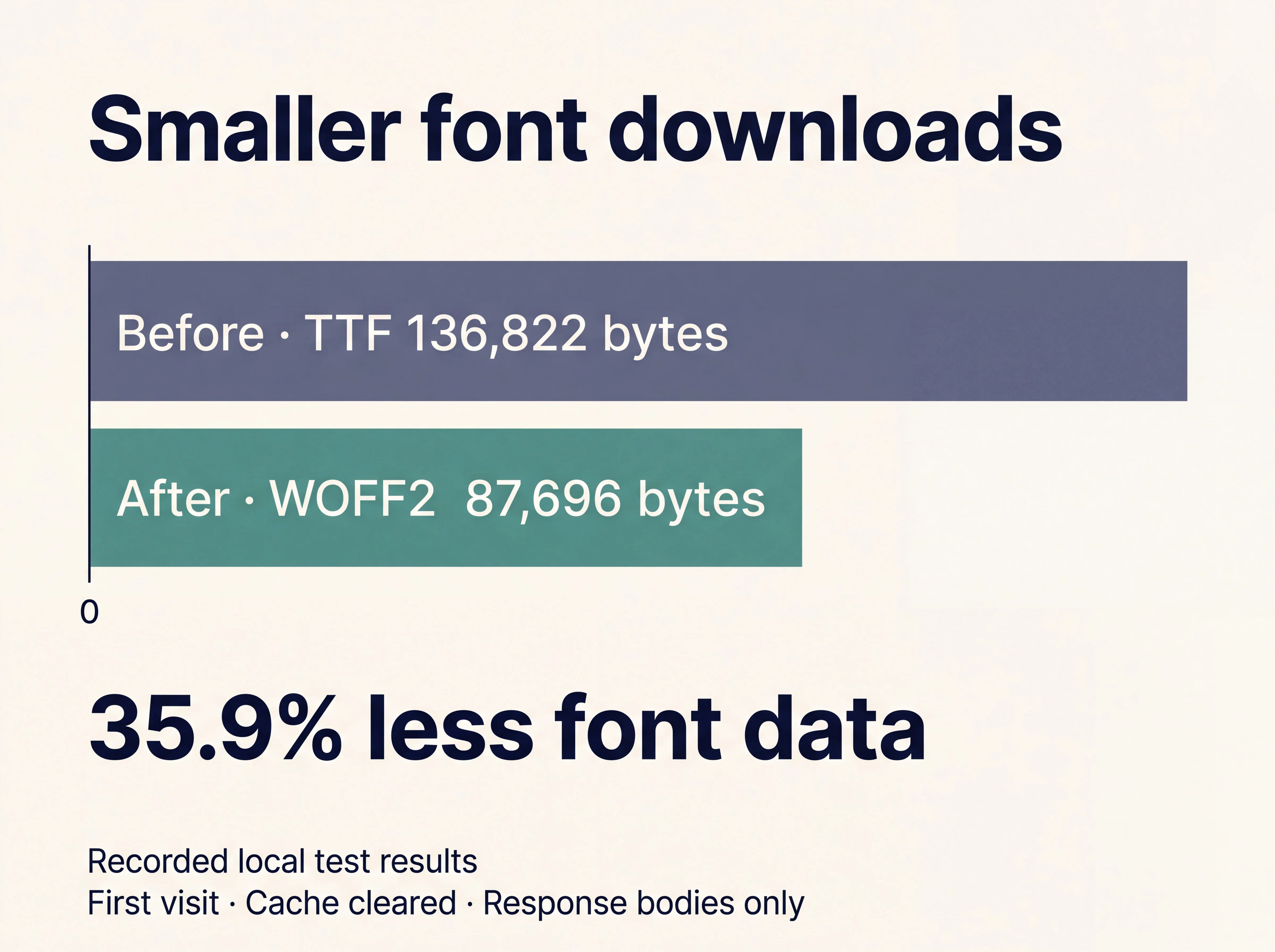
Because the server was already compressing the TTF files during delivery, visitors were previously receiving compressed responses rather than raw disk data. The actual reduction in data travelling over the wire was 136.8 KB down to 87.7 KB - a 35.9% improvement.

Both metrics are useful, but only the network transfer figure reflects what visitors are actually waiting for over a mobile connection.

Font downloads decreased from 136,822 bytes for TTF to 87,696 bytes for WOFF2, a 35.9% reduction.
Comparing delivered response sizes for TTF versus WOFF2 formats

Converting TTF to WOFF2 without losing quality

WOFF2 (Web Open Font Format 2) is designed specifically for the web. It uses built-in Brotli compression to package font data into smaller bundles that modern browsers decode on the fly.

Rather than "subsetting" (which shrinks file sizes by stripping out unused glyphs, accents, or special characters), we kept all existing character maps, font tables, and hinting instructions intact.

Before rolling out the converted files, we verified four key attributes:

  1. Character Mappings: Ensuring no special symbols or accents disappeared.

  2. Shape Renderings: Checking vector outlines at both high and low DPI settings.

  3. Spacing & Kerning: Guaranteeing letter spacing matched the original layout.

  4. Hinting Rules: Confirming text remained crisp on smaller mobile screens.

MeasurementOriginal TTFConverted WOFF2
Combined files on disk322,724 bytes87,696 bytes
Downloaded font response bodies136,822 bytes87,696 bytes
All custom fonts ready1.89 seconds1.44 seconds
Repeat-visit font bytes transferred00

Auditing your next/font/local setup

We loaded our self-hosted fonts using next/font/local. Changing the font files to WOFF2 required updating the path sources in our configuration, while keeping our established loading strategies intact.

Code example - Next.js local font configuration

TypeScriptconst proxima = localFont({
  src: [
    {
      path: './fonts/proxima-nova-light.woff2',
      weight: '300',
      style: 'normal',
    },
    {
      path: './fonts/proxima-nova-regular.woff2',
      weight: '400',
      style: 'normal',
    },
  ],
  preload: true,
  display: 'swap',
  adjustFontFallback: 'Arial',
  variable: '--font-proxima',
})

Adding preload: true doesn't invent preloading if it was already active by default. In Next.js, font preloads often appear in the HTTP Link response headers rather than directly inside <head> tags. Inspecting actual network headers in dev tools prevents you from misdiagnosing missing preloads!

Understanding font readiness and rendering metrics

To test the impact under mobile conditions, we ran headless Chrome against a local production build with a 390 × 844 viewport, a 4x CPU slowdown, and a throttled 3G connection (200 KB/s, 120ms latency).

Across our lab runs, all three custom fonts became ready 0.45 seconds faster (a ~23.7% improvement in font readiness time).

However, it's important to separate font readiness from page performance:

  • Font readiness: Measures when the browser finishes downloading and parsing font assets.

  • First contentful paint (FCP): Measures when the browser first renders visible text or elements.

  • Fallback Display: With display: 'swap', fallback fonts (like adjusted Arial) render instantly while the custom WOFF2 files download in the background.

Testing cache policy and network failures

Performance testing isn't complete without repeating visit and failure scenarios:

  1. Cached Visits: Because Next.js applies hashed URLs with long-term immutable caching, repeat visits transferred 0 bytes of font data. Converting to WOFF2 preserved this caching behaviour smoothly.

  2. Network Failures: To ensure resilience, we blocked font requests in dev tools. The application gracefully degraded to our Arial fallback font without throwing runtime errors or blocking heading visibility.

  3. Layout Shift Reduction: Using Next.js's built-in adjustFontFallback: 'Arial' automatically adjusts the fallback font's size and kerning, reducing cumulative layout shift (CLS) when the custom font swaps in.

How to Audit Web Font Performance

Optimising typography isn't just about converting file formats - it's about measuring real-world delivery. Here are four principles to follow when auditing web fonts:

  1. Measure delivered network bytes: Not just raw disk sizes, Gzip and Brotli compression change things significantly.

  2. Verify font integrity after format conversion: Ensure kerning, hinting, and character sets remain intact.

  3. Inspect HTTP headers for preloading: Next.js often preloads via Link headers rather than inline HTML tags.

  4. Always test fallback fonts and offline states: Ensure your UI stays readable even when font requests fail.